

Put the evidence to work.
Reports and exports will carry the scope, dates and sources of a review into the work your team needs to share or revisit.
See how the evidence travels.
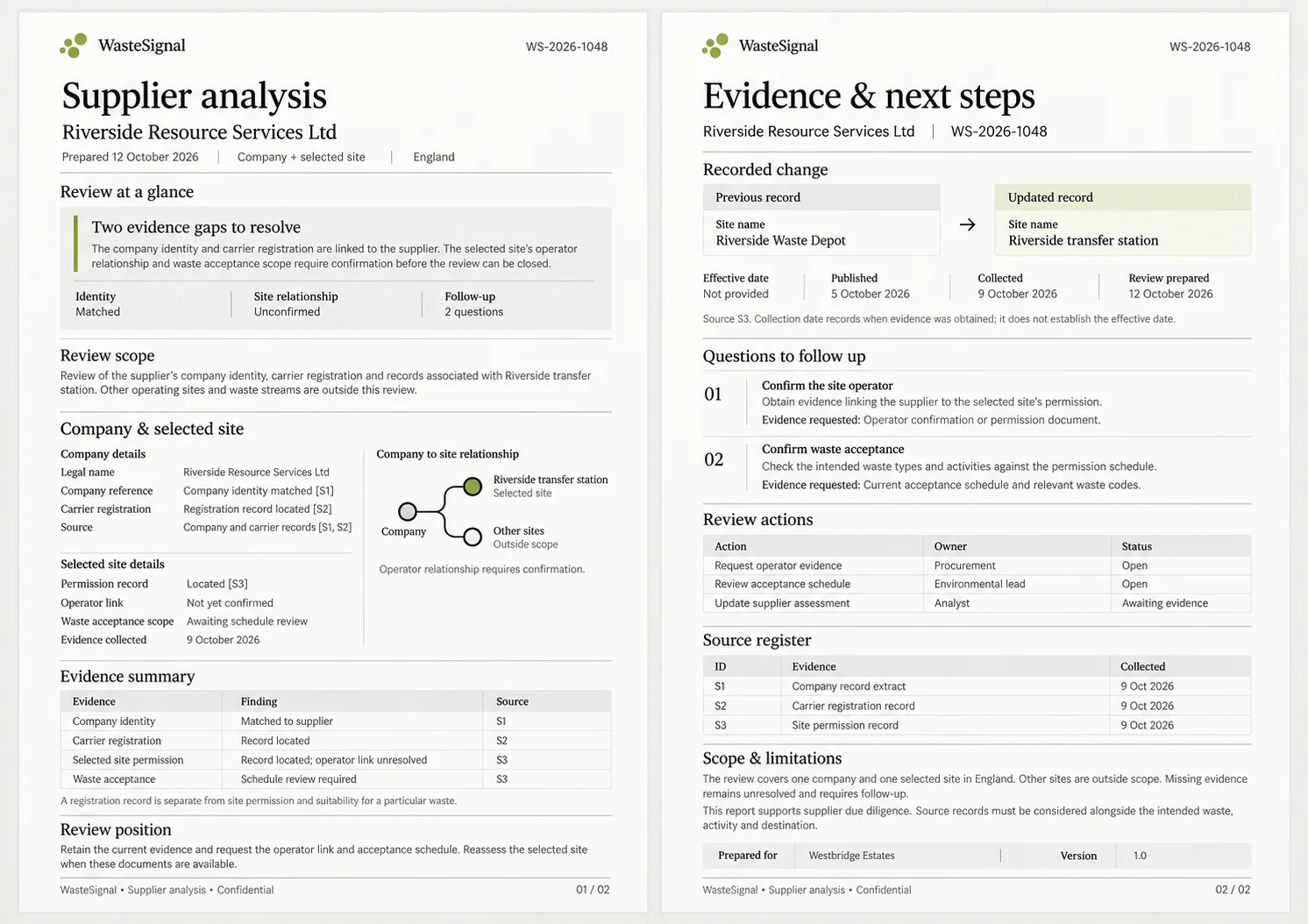
A supplier analysis brings the company, selected site and supporting records into one dated review, with the scope and outstanding questions visible.
- Review scope Company and selected site, with other sites outside the review.
- Evidence in context Company identity, registration and site permission remain distinct.
- Follow-up retained Operator links, waste acceptance and missing dates stay visible.
Company PDF reports —
The company report is a dated evidence summary. It will bring the business identity, relevant registrations, linked site permissions, supported history and outstanding questions into a readable record.
A report should explain what was reviewed and what remains uncertain. It is not a compliance certificate, a quality endorsement or a guarantee that another party will accept the findings.
- Company identity and the reviewed company/site scope.
- Source references and available record dates.
- Relevant registrations, permissions and supported activities.
- Confirmed history and events, with outcome and date context.
- Unresolved links, source freshness and coverage gaps.
CSV exports —
CSV outputs will support further review in spreadsheets or other systems. The structure keeps company, site, registration and event records distinguishable, with identifiers that let related records be connected.
A download should preserve jurisdiction, source references, dates and missing-data states. Export permissions and source rights will apply alongside the eventual package allowance.
An example report structure
Illustrative report contents: the sections below show how scope, evidence and outstanding questions can be organised.
| Section | What it explains |
|---|---|
| Review scope | The company, sites, report generation date and sources included. |
| Identity and permissions | Matched identifiers, registrations, operators and site authorisations. |
| History and changes | Supported events with their effective, publication and detection dates. |
| Questions to follow up | Unresolved identities, missing fields, limitations and items needing direct confirmation. |
| Evidence references | The source records and documents behind the report. |
Excel exports
For Excel-based review, describe the datasets and relationships your team needs to work with. Separate sheets can help distinguish companies, sites and events; formats and allowances need to fit the agreed scope.
Customer API access
For API requirements, explain which company, site and event information your software needs. Evidence references, coverage and uncertainty should travel with the response.
Endpoint contracts, authentication, usage limits and source rights need to be agreed before an integration is activated.
Webhooks
For webhook requirements, explain the confirmed watch events and receiving systems involved. The integration scope should define event identifiers, authentication, retries and delivery behaviour.
Evidence, access and capacity travel together
Every output must respect source rights, the customer’s authorised scope and the agreed usage allowance. Selecting a different format or using an API should not bypass those controls.
Discuss SAML/OIDC single sign-on requirements as part of a premium, individually quoted enterprise agreement.
What does your team need to take away?
Think about who reads your reports, which datasets you need and how findings fit into existing systems. These requirements will help shape the eventual formats.